
- Home
- Call management CRM
- HubSpot call logging
HubSpot call logging
HubSpot Call Logging for SIM Calls From Android Phones With Calsyst
HubSpot call logging means saving each phone conversation as a call activity on the matching contact, so the timeline shows who spoke and when. Calsyst captures SIM calls on Android phones and passes them on through webhooks or its outbound API.
- SIM calls captured on each Android phone
- Sent out by call webhook or outbound API
- Bridged with Zapier, Make, Pabbly or n8n
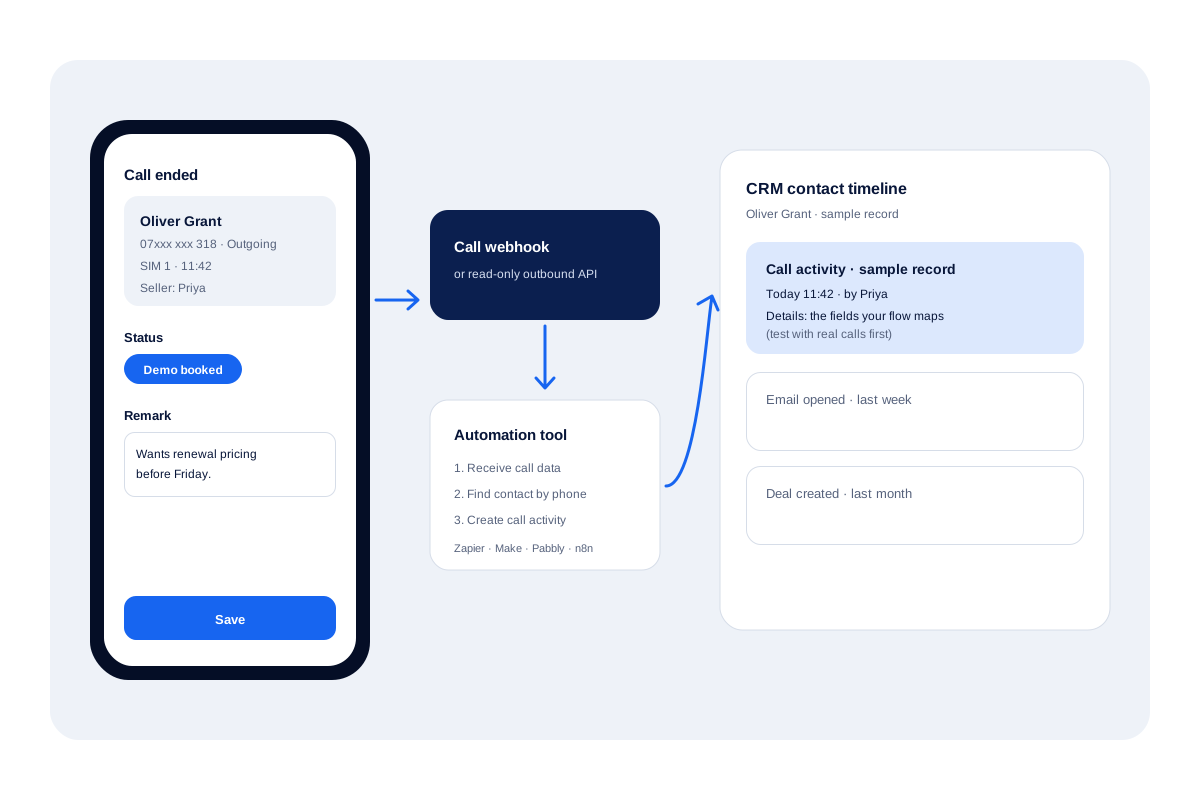
What is a hubspot call logging?
HubSpot call logging saves each customer call as a call activity on the matching record, so the whole team sees the conversation history.
Calsyst is a call manager and CRM that supplies the SIM call data for HubSpot call logging, through a webhook or its outbound API.
- HubSpot stores calls as activities.
- Calsyst captures calls made on mobile SIMs.
- An automation tool joins the two.
HubSpot call logging benefits
Why teams with HubSpot add a phone-side call capture.
Mobile calls stop vanishing
Calls placed from a seller's own SIM are captured on the handset instead of being typed in later.
Outcome stays on the call
The status and remark live on the call in Calsyst; check whether your webhook data carries them before you map fields.
Your choice of bridge
Use Zapier, Make, Pabbly or n8n, whichever your team already pays for or hosts.
Work stays in one app on the phone
Sellers dial, note and follow up in Calsyst; HubSpot receives the record for managers.
Read-only API for pulls
The outbound API lets your developer read call data on their own schedule.
HubSpot call logging: why mobile SIM calls go missing
HubSpot keeps a timeline for every contact. Calls placed through its own tools land there by themselves. Calls a seller makes from a personal mobile do not, so they only appear if someone types them in afterwards, and on a busy day that rarely happens.
Calsyst sits on the phone side. It logs every SIM call on the Android handset, asks for a status and remark after the call, and offers that data to the outside world.
Log calls in HubSpot from Calsyst: the bridge
1. Calsyst captures the call
The handset log keeps each call’s number, direction and time, and when the line closes the seller may tag a status and jot a remark. The call management CRM page explains that capture.
2. Data leaves Calsyst
Choose a call webhook, which pushes call data to an address you set, or the read-only outbound API, which your developer queries.
3. An automation tool writes to HubSpot
In Zapier, Make, Pabbly or n8n, take the incoming call data, find the matching contact, and create a call activity on it. Build and test this flow yourself; field names depend on your flow.
HubSpot call tracking routes compared
| Route | Where the call is placed | Effort | Best for |
|---|---|---|---|
| Manual logging | Any phone | Typing after every call | Very low call volume |
| Calsyst plus a flow | The seller's SIM on Android | One automation flow to build and test | Field and mobile sellers |
HubSpot calling limits of this setup
- No native connector: you build and maintain the automation flow.
- Calsyst does not match HubSpot contacts itself; your flow does that step.
- iPhone calls are not captured, because the iPhone app has no call log.
- Call audio is not part of this route.
- Which fields arrive, and how fast, depends on your setup; test with real calls first.
For leads flowing the other way, from forms into Calsyst, see lead automation. For a full HubSpot alternative on the phone, the CRM with dialer page is the place to start.
HubSpot call logging for a field team
A software reseller in Manchester keeps its pipeline in HubSpot, but its 4 field sellers call customers from their own Android phones.
The sales operations lead adds a call webhook in Calsyst and a Make scenario that receives each call, searches HubSpot by phone number and creates a call activity from whatever fields the webhook delivers.
For the first week the lead compares 20 calls a day in both systems by hand before trusting the flow.
HubSpot call logging FAQ
How can SIM calls from staff mobiles reach HubSpot call logging?
Through a bridge. Calsyst captures the call on the phone and sends it by call webhook or makes it readable by outbound API; Zapier, Make, Pabbly or n8n then creates the HubSpot activity.
What is Calsyst?
Calsyst is a call manager and CRM for Android and iPhone; for HubSpot users it is the phone-side tool that captures SIM calls for HubSpot call logging.
Does Calsyst have a native HubSpot integration?
No. There is no one-click connector. SIM call records leave by webhook or are read from the outbound API, then a flow you build writes them into HubSpot.
Is it possible to add a call to HubSpot manually?
Yes. HubSpot lets you log an activity on a record; its own knowledge base gives the current steps, which this page does not repeat.
Can HubSpot track phone calls by itself?
Only for calls it logs itself. HubSpot saves calls as call activities on records; a call dialled from a personal SIM reaches it only through a route like this one.
Which call details can my flow send to HubSpot?
Whatever fields arrive in the webhook or API response. Which details arrive is for you to check; test with a few calls and map only what you see.
Will the HubSpot contact be matched by phone number?
Only if your flow does it. Most automation tools can search HubSpot for a contact by phone number before creating the call activity; set that step up yourself.
Do iPhone calls reach HubSpot too?
No. The iPhone app has no call log, so this route needs Android handsets.
Does this setup record call audio into HubSpot?
No. Audio is outside this route; Calsyst only collects files the handset recorder already saved, and moving them into HubSpot is not covered here.
Can Calsyst pull HubSpot contacts in as leads?
Yes, indirectly. Leads come into Calsyst through a Google Sheet, the REST API or the Custom Webhook, so a flow can send HubSpot contacts that way.